

Our Animated Splash Was Tanking the Mobile PageSpeed Score. It Wasn't the Image.
An animated hero, a mobile score stuck in the 60s, and a fix that came down to one render-blocking stylesheet, not the image. Updated August 2026 with a new splash and a layout shift the score was hiding.
Our Animated Splash Was Tanking the Mobile PageSpeed Score. It Wasn't the Image.
Our homepage opens with a splash. On Google's Lighthouse test it scored 98 out of 100 on desktop. On mobile it sat in the 60s, sometimes failing outright, and the number dragging it down was Largest Contentful Paint (LCP).
A "paint" is the browser drawing pixels to the screen. First paint is when anything shows up. The largest contentful paint is when the biggest piece of real content, usually a headline or an image, finishes drawing. Google weighs LCP heavily because it stands in for "the page looks ready."
We got it wrong twice before the breakdown showed us the answer. The short version: the logo was ready instantly, but the browser would not paint it until a separate stylesheet request came back. Inline the CSS so it ships with the page, and the logo paints right away. The image fixes we tried first barely moved it.
The first suspect: the logo
On mobile the tagline is hidden, so the biggest thing on screen is the logo.
Chrome will not let a drawing written straight into the page (an inline SVG, for scalable vector
graphics) count as the largest paint. Plain text counts. An <img> tag counts, even pointing at an SVG
file. An <svg>...</svg> written into the HTML does not. Our logo was the inline kind, and on mobile it
was the only big thing on screen, so the test had nothing valid to measure and reported an error.
Swapping it for an <img> tag cleared the error.
The score barely moved. LCP was still four or five seconds, and it jumped between runs. A number that swings by whole seconds is not held back by one slow thing you can point at.
The test that ruled out the image
If the logo is slow, the usual suspect is the network: it is a separate file the browser has to fetch, and on a slow connection that fetch waits behind the CSS and JavaScript. Inline the image into the HTML as text (a data URI), so there is no separate file and no request. If the download was the problem, the logo should now paint about when the rest of the page first does, near a second.
It did not. With the image inlined, LCP was still about five seconds. The download was never the bottleneck. Whatever held the logo back happened after the bytes were already in hand.
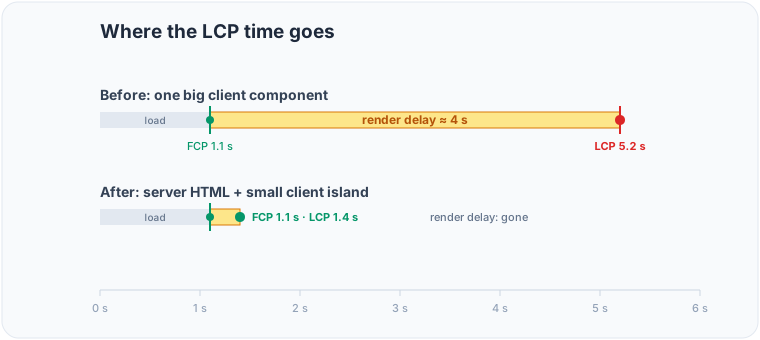
Where the time actually went
Total Blocking Time (TBT, roughly how long the page is too busy to respond to a tap) was tiny, about 20 milliseconds. The main thread was free, so the delay was not JavaScript either.
Lighthouse splits LCP into two parts: loading the element, then drawing it. Time to first byte: basically zero. Load time: zero, since the logo is inline. Render delay: about two and a half seconds. The pixels were in the HTML, the server was fast, the main thread was idle, and still nothing drew for over two seconds.
One thing makes a browser hold a ready element off the screen like that: it is waiting on render-blocking CSS. The page shipped its styles as one separate stylesheet, and a browser will not paint anything until that file is fetched and parsed. On a throttled phone that single extra round-trip was the whole gap, and its timing wobbled run to run, which is why the score bounced between 70 and 96 on identical code.
The fix
Next can inline the CSS straight into the HTML, so the styles arrive in the same response as the markup. No separate stylesheet, no extra round-trip, nothing render-blocking between the HTML and the first paint.
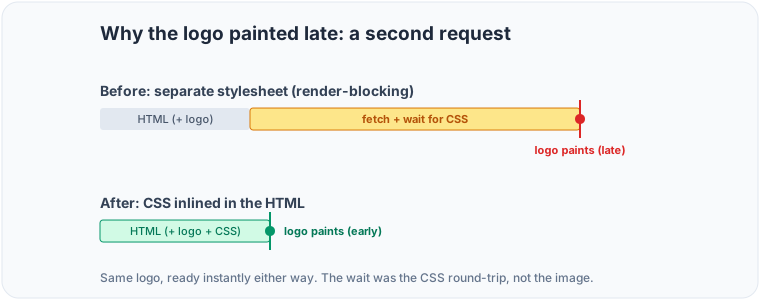
With the CSS inlined, render delay collapsed and the logo painted with the page. Mobile went from the 60s to a steady 100, and the run-to-run bouncing stopped, because the thing that varied, that one CSS request, was no longer on the path.
We also moved most of the page to server-rendered HTML instead of one big client component, and dropped a JavaScript animation library off the first load. That cut the blocking time. But the LCP gate was the stylesheet, not the JavaScript, and only inlining the CSS made the number stick.
What to check
- Read the LCP breakdown, not just the number. If render delay dominates while time-to-first-byte and load time are near zero, you are not waiting on the network or the server. You are waiting on something that blocks rendering.
- Render-blocking CSS is a frequent cause. One stylesheet is one extra round-trip between the HTML and the first paint, and on a slow connection that can be seconds. Inline it, or split it so the above-the-fold styles ship with the page.
- A data URI rules out the network in one move. If inlining the image does not change LCP, stop optimizing the image.
- An image drawn straight into the HTML (inline SVG) does not count as the largest paint. Use an
<img>. - A green Total Blocking Time does not mean a fast paint. They measure different things, and a free main thread can still sit behind a render-blocking request.
- Trimming JavaScript (server components, fewer libraries) helps responsiveness and weight even when it is not what gates the paint.
- None of this needed a content delivery network (CDN). It was about what blocks the first paint, fixed in the build.
Performance as accessibility
Performance is part of accessibility, which is a core tenet of this studio. A hero that feels instant on a laptop can be unusable on a cheap phone over a weak connection, and that phone is somebody's only device. Getting it to appear fast there is part of the same work as getting it to run with a screen reader or at 400% zoom.
Update, a month later: the weight moved, not the blocker
The mobile score slid back into the 70s. The render-blocking culprit from last time was gone. The new drag was download weight: the page was pulling about 940 kilobytes on mobile, nearly half of it a single 450-kilobyte bundle from Cloudflare Turnstile, the "are you a human" check on our contact form.
On the homepage that form sits far below the fold, but the widget loaded its scripts the instant the page did, so on a phone over a weak connection that 450 kilobytes competed with the content people came to see. It never hurt desktop, which is why the score split.
The widget is now lazy: it loads when the form scrolls near the screen, and on the dedicated contact page, where the form is right there, it still loads at once. Page weight dropped from about 940 kilobytes to 490, and mobile went from the mid-70s to 93, desktop 99.
Update, August 2026: a new splash, and a layout shift the score was hiding
The splash this post describes is gone. It has been replaced by the brand pack's pillar signature: four dots become the four pillar symbols, then the word SUCH, and the page takes over. The animation is one generated SVG whose CSS timeline is scaled to end at 1337ms, and the gate that holds it reads the same value, so the cover cannot be dismissed mid-draw.
Making it advance on its own surfaced a defect that had been shipping for some time. Cumulative Layout
Shift went from 0 to 1.0, and the cause was not the new animation. The splash had always been a
min-h-[100svh] block in document flow, and it only became fixed on the way out. Dismissing it pulled
a full viewport of height out of the flow and moved the hero by a whole screen.
A click hid that from the metric. CLS excuses shifts within 500 milliseconds of user input, so anyone who
clicked through never contributed the shift to their score. Anyone who did not click contributed all of
it. Visitors with prefers-reduced-motion, and anyone returning within the same session, skip the splash
and never click, so they took the full shift. Measured against production before the fix, that path
scored 74 on mobile with CLS 1.0, while the headline number was 100. The score was accurate for
clickers and wrong for everyone else.
The fix was structural: the splash is a fixed overlay from its first paint, so it is never in flow and removing it cannot reflow anything.
A second, smaller defect came out of the same work. The splash is server-rendered, so on a refresh the
browser painted it and hydration removed it a frame later, which is the flash people were seeing.
React cannot prevent that: even useLayoutEffect runs after the first paint of the server HTML. The
decision now happens in a synchronous script in <head> that reads the session flag and
prefers-reduced-motion and stamps the root element, so a returning visitor never gets a painted frame
of it.
Current production, measured this week:
| Score | LCP | CLS | TBT | |
|---|---|---|---|---|
| Mobile | 97 | 1.2 s | 0.013 | 20 ms |
| Desktop | 98 | 1.0 s | 0.005 | 0 ms |
Mobile gives up two or three points against the old headline 100, all of it Speed Index, which is the unavoidable cost of holding a cover at all. The reduced-motion path now scores 98 rather than 74. That trade is the point of the update: a 97 that is true for every visitor is worth more than a 100 that was only true for the ones who clicked.
The lesson repeats. Twice before, the number was hiding where the cost actually was. This time the number was hiding who was paying it.